Integrated Wires System Resource Hub
What's Changing?
The wire service experience will be streamlined within eBanking to improve security, efficiency, and ease of use.
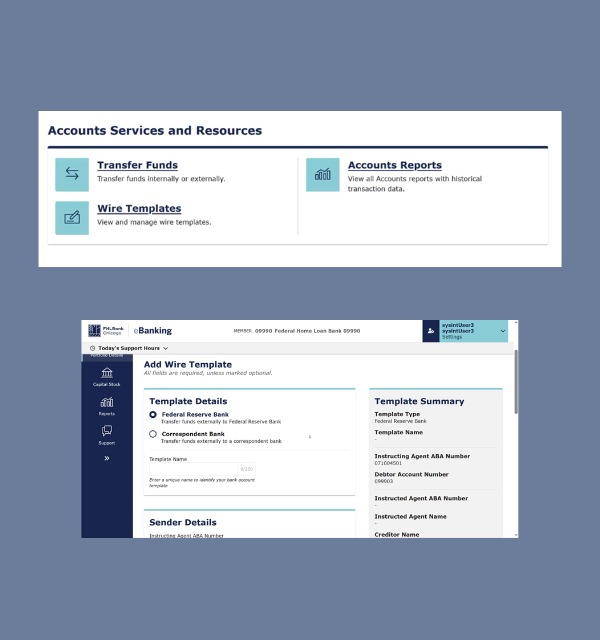
Centralized Wire Service
- Removal of RSA Token
Wire transfers will now be initiated and authorized directly within eBanking, eliminating the need for separate logins and RSA tokens for authentication. - Wire Templates Available in eBanking
Members can manage up to three standardized wire templates directly in eBanking. The platform provides streamlined workflows for creating, submitting, and approving Wire templates. - New Wire Activity Report in eBanking
A new intraday wire activity report is available in eBanking, replacing the current Journal Report download. This report provides centralized access to Wire transaction data for easier monitoring and reconciliation. - Consolidated Find Transactions
Wire transaction search functionality is now integrated within the Account Details page, allowing members to search historical wire transactions by date in one centralized location
Administrative Changes
Several administrative updates have been made to simplify wire access and approval management.
- Wire Role Changes
The Direct Wire role has been deprecated. Users who require wire access will only need the wires role for wire approval. - Wire Verification Settings
Direct Wire functionality has been replaced by Wire Verification Settings in eBanking. Members can self-manage switching between single and dual verification for wire approvals. - Removal of Direct Wire Agreement
The Direct Wire Agreement is no longer required. Members who previously signed the agreement will automatically be set to Single verification. - Wire Limits
Member Security Administrators must approve any changes to Wire limits and Wire related user roles.

Wire Resources
Quick access to training videos, guides, and reference materials related to wire services in eBanking. Use the resources below to learn how to submit wire transactions, manage user settings, and maintain wire templates.
Getting Started
Recommended resources if you are new to our wire services are available in eBanking.

.jpg?sfvrsn=f9eadbc7_1)
FAQs
Find answers to your most pressing questions about our new wires resource hub here.
Yes. You will no longer need a physical or soft RSA token to access the wires system. Wire transfers will be initiated and authorized directly in eBanking.
Please retain your RSA token until March 31 in case of unexpected issues during the transition period.
No, Direct Wire historically was available to members who signed a special Direct Wire Agreement in eBanking. This feature has been replaced with Wire Verification Settings, allowing members to opt into either Single or Dual approval settings.
Member Administrators can opt for Single Approval, where only one approved wire user can submit a wire transaction without additional approval. The Dual Approval preference requires two users to submit and approve a wire within their assigned limits.
There is no separate agreement to sign up for this new option.
All members that are currently using Direct Wire will be converted to Single Approval option in the Wire Verification Settings page on eBanking, at go-live.
The institution’s MSA can change their settings at any time through the Wire Verification Settings page.